Vericut Optimizer 3.0 introduces AI-powered assistance, simplified workflows and expanded savings analysis for NC program optimisation. The latest release helps manufacturers identify machining time reductions, compare program changes and quantify potential cost savings across production operations.
Vericut Optimizer 3.0 introduces AI-assisted guidance, improved NC program comparison and enhanced reporting tools to help manufacturers evaluate machining time and cost savings.
(Source: Vericut)
Vericut has released Optimizer 3.0, an updated version of its standalone NC program optimisation software. The release introduces a redesigned user interface, integrated AI-assisted guidance and expanded tools for analysing, calculating and reporting machining time and potential cost savings. The changes are intended to simplify programming workflows and provide greater insight into the technical and economic effects of NC program optimisation.
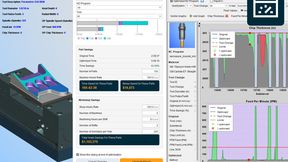
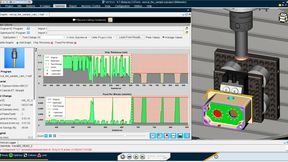
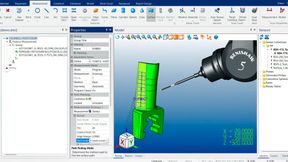
Vericut Optimizer 3.0 features a revised dark-blue interface with reorganised menus, toolbars and layouts. NC programs, machining data, optimisation graphs and time-saving information are presented in an updated workspace.
A new Optimisation Control Bar combines frequently used functions, including Rewind, Optimise, Air Cuts and Learn From NC Program, with analysis tools. Status indicators display progress during optimisation.
The Optimise, Air Cuts Only and Learn From NC Program windows have also been standardised. Information such as the optimised file, stock material and machine is displayed in consistent locations, while operation-specific settings are organised into expandable sections.
An updated Welcome Screen provides access to existing and new projects, recently used files with image previews, tutorials, sample projects, documentation, technical support and training resources.
AI Assistant provides context-sensitive guidance
The release introduces Vericut Assistant, an integrated AI-powered tool that allows users to request guidance using natural-language questions. The assistant provides step-by-step instructions for tasks such as comparing original and optimised NC programs, creating coordinate systems and navigating optimisation functions.
Context-sensitive assistance is also available through the F2 key, which opens extended tooltips explaining the purpose and use of individual functions. The F1 key continues to provide access to the corresponding help documentation.
A new dockable Training Viewer enables users to access tutorials and training materials within the software workspace while working on NC programs.
Expanded analysis of machining time and cost savings
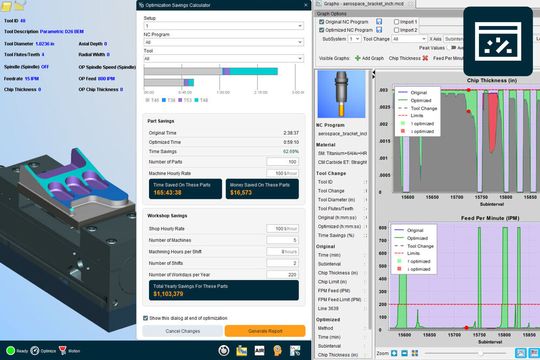
The updated Optimisation Savings Calculator allows users to compare original and optimised machining times and calculate the resulting time savings. By incorporating production volumes and machine hourly rates, the software can also estimate potential cost reductions.
Workshop-level settings extend these calculations across multiple machines, allowing manufacturers to assess the cumulative effects of NC program optimisation.
Results can be analysed by setup, NC program and individual tool. A new reporting function enables users to generate summaries of the estimated savings for production planning and management purposes.
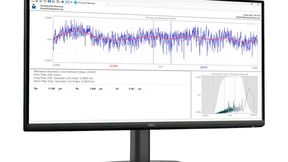
The revised Tool Use display shows original and optimised machining times, absolute time savings and percentage improvements. A graphical timeline and expandable tool details provide additional information on individual tools and tool changes.
Updated graphs also distinguish more clearly between original and optimised machining data, supporting the analysis of changes in machining conditions and program performance.
Side-by-side comparison of NC programs
Vericut Optimizer 3.0 also introduces an updated Compare NC Programs function that displays original and optimised NC code side by side.
Changes are colour-coded, with original code highlighted in red and optimised replacements in green. Modified feed rates and other parameters are identified, along with additional lines generated by split moves.
Date: 08.12.2025
Naturally, we always handle your personal data responsibly. Any personal data we receive from you is processed in accordance with applicable data protection legislation. For detailed information please see our privacy policy.
Consent to the use of data for promotional purposes
I hereby consent to Vogel Communications Group GmbH & Co. KG, Max-Planck-Str. 7-9, 97082 Würzburg including any affiliated companies according to §§ 15 et seq. AktG (hereafter: Vogel Communications Group) using my e-mail address to send editorial newsletters. A list of all affiliated companies can be found here
Newsletter content may include all products and services of any companies mentioned above, including for example specialist journals and books, events and fairs as well as event-related products and services, print and digital media offers and services such as additional (editorial) newsletters, raffles, lead campaigns, market research both online and offline, specialist webportals and e-learning offers. In case my personal telephone number has also been collected, it may be used for offers of aforementioned products, for services of the companies mentioned above, and market research purposes.
Additionally, my consent also includes the processing of my email address and telephone number for data matching for marketing purposes with select advertising partners such as LinkedIn, Google, and Meta. For this, Vogel Communications Group may transmit said data in hashed form to the advertising partners who then use said data to determine whether I am also a member of the mentioned advertising partner portals. Vogel Communications Group uses this feature for the purposes of re-targeting (up-selling, cross-selling, and customer loyalty), generating so-called look-alike audiences for acquisition of new customers, and as basis for exclusion for on-going advertising campaigns. Further information can be found in section “data matching for marketing purposes”.
In case I access protected data on Internet portals of Vogel Communications Group including any affiliated companies according to §§ 15 et seq. AktG, I need to provide further data in order to register for the access to such content. In return for this free access to editorial content, my data may be used in accordance with this consent for the purposes stated here. This does not apply to data matching for marketing purposes.
Right of revocation
I understand that I can revoke my consent at will. My revocation does not change the lawfulness of data processing that was conducted based on my consent leading up to my revocation. One option to declare my revocation is to use the contact form found at https://contact.vogel.de. In case I no longer wish to receive certain newsletters, I have subscribed to, I can also click on the unsubscribe link included at the end of a newsletter. Further information regarding my right of revocation and the implementation of it as well as the consequences of my revocation can be found in the data protection declaration, section editorial newsletter.
A change counter, text search and Go To Line function support navigation through larger programs. Version information and timestamps provide additional information for tracking modifications.
These functions allow programmers to examine how optimisation has altered an NC program and identify the changes associated with calculated machining time savings.
Standalone optimisation across CAD/CAM systems
Vericut Optimizer 3.0 remains a standalone application that can be used alongside existing CAD/CAM software. It supports APT/CL files and G-code from a wide range of CAD/CAM systems, covering two- through five-axis machining.
Manufacturers can therefore optimise existing NC programs without replacing their CAM systems or changing their established programming environments.