


:quality(80)/p7i.vogel.de/wcms/b0/7a/b07a7095a06502f296a68cc23c0333fd/0133339310v4.jpeg "The positive trends experienced in the machine tool industry are continuing into the second quarter: incoming orders increased by 12 percent compared to the previous year. (Source: VDW)")
:quality(80)/p7i.vogel.de/wcms/4b/e2/4be222cca85fc9ccbdf26c552cfc3c4c/0132990447v1.jpeg "A research project highlights potential of high-quality material loops for cars. (Source: BMW Group)")
:quality(80)/p7i.vogel.de/wcms/55/47/55478646728684cec46485443d736f85/0132634476v1.jpeg "Geopolitical tensions and weak demand weighed heavily on Italy's machine tool industry (Source: free licensed / KI-generiert)")
:quality(80)/p7i.vogel.de/wcms/2f/7a/2f7ac201c1abc14dc40a30d947684069/0132348722v1.jpeg "The Nova5e110T, a latest-generation all-electric injection moulding machine, produces a food-packaging application using liquid silicone rubber injection moulding. (Source: Negri Bossi)")
:quality(80)/p7i.vogel.de/wcms/ca/7f/ca7fe83775a6375546830e0c35d4d437/0133611107v2.jpeg "From 2027 onwards, Plastifocus will be jointly organized by Messe Düsseldorf India and PMMAI. (Source: Plastifocus)")
:quality(80)/p7i.vogel.de/wcms/8e/25/8e2561d12b8caeba7125507a0c957e6e/0133564611v1.jpeg "Nexgem brings together companies from the worlds of mechanical engineering, IT and software. (Source: VDW)")
:quality(80)/p7i.vogel.de/wcms/48/a5/48a599231b179ed4c8f2fc4f00fc80ac/0133459364v2.jpeg "Fakuma 2026 will mark its 30th edition in Friedrichshafen from 12 to 16 October, with around 1,600 exhibitors from 40 countries, innovation awards, expert discussions and career initiatives. (Source: Fakuma)")
:quality(80)/p7i.vogel.de/wcms/13/22/13224a29676f9fba818db663bcc63729/0133443239v1.jpeg "That’s a wrap for another AMB in Stuttgart. In around two years, metalworking innovations will once again take centre stage in Baden-Württemberg. Here, the organiser and industry representatives reflect on this year’s event ... (Source: Th. Wagner / Messe Stuttgart)")
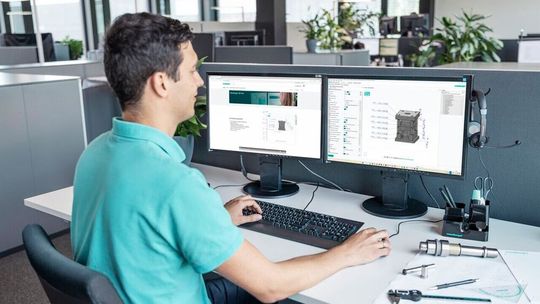
:quality(80)/p7i.vogel.de/wcms/ef/d9/efd965669c2b340c38a2c20dcf4afa81/0133864608v2.jpeg "In its portal, Meusburger has brought together the content and functions that are especially relevant for designers. (Source: Meusburger)")
:quality(80)/p7i.vogel.de/wcms/be/e8/bee8bde13322fc346ce002a4c89532e7/0133864600v2.jpeg "Dry Station “Krake” by Nonnenmann (Source: Nonnenmann)")
:quality(80)/p7i.vogel.de/wcms/e6/c3/e6c340d00ffdfcd19deb929048e947b6/0133867133v2.jpeg "Strack Norma’s Z41 flat latch lock features a new latch geometry designed to handle higher pulling and locking forces in injection moulds while maintaining a compact design. (Source: Strack Norma)")
:quality(80)/p7i.vogel.de/wcms/bf/4c/bf4c62c3279e5188bcd48126a83da56c/0133748224v2.jpeg "Bottle insert for blow moulding (Source: Ampco)")
:quality(80)/p7i.vogel.de/wcms/19/ea/19ead0e1b537e322629604b4e5c9a30b/0133747715v2.jpeg "Large-format 3D printing application: an automotive inspection fixture that is precise and light enough to handle without a crane. (Source: Herrmann Additive)")
:quality(80)/p7i.vogel.de/wcms/5d/3e/5d3ef4c4bdab296c816e624b38e624c6/0133609076v2.jpeg "BMFs PSL micro-precision 3D printing enables complex 3D microfluidic channels and intricate internal geometries for rapid design validation (Source: BMF)")
:quality(80)/p7i.vogel.de/wcms/32/44/32440bdff907b379245f456130355549/0133341463v1.jpeg "Stratasys F870 FDM system, a large-format additive manufacturing platform designed for industrial manufacturers, automotive OEMs, aerospace & defense production lines, looking to scale production on the factory floor. (Source: Stratasys)")
:quality(80)/p7i.vogel.de/wcms/f6/6e/f66e3f322d7e2a8fe7e80f808c67e607/0133319745v2.jpeg "Formnext brings together the global AM community and showcases the latest innovations in industrial 3D Printing and advanced production technologies. (Source: Mesago / Marc Jacquemin)")
:quality(80)/p7i.vogel.de/wcms/45/01/4501752ebc868bfb7b476a2a163f8ecc/0133744823v1.jpeg "(Source: Yamazaki Mazak )")
:quality(80)/p7i.vogel.de/wcms/2e/16/2e164579148a37acfe863dd3fbd9efb4/0133610821v2.jpeg "The FG-400 Neo, built for large-scale heavy-duty structural tube processing, will also be on display at Euroblech 2026. (Source: Mazak)")
:quality(80)/p7i.vogel.de/wcms/24/07/2407a4874f3c763937892a12e3e7d125/0133564963v2.jpeg "(Source: Walter)")
:quality(80)/p7i.vogel.de/wcms/03/8e/038ec919753fabff71f6e3473c772f74/0133130761v2.jpeg "The core reason behind the adoption of humanoid robots in the manufacturing or tool and mould making industry is the lack of labour in these markets. (Source: © Maksudul - stock.adobe.com)")
:quality(80)/p7i.vogel.de/wcms/d9/7d/d97d67bf74d61234a4e2dd138ca6e6c8/0133863615v2.jpeg "Presentation of the Research Project of the Year 2026 award to Eike Rodenbäck on 17 September 2026. From left: Dr Stephan Kohlsmann, Chairman of the VDW Research Institute; Eike Rodenbäck, DFKI; and Dr Alexander Broos, Managing Director of the VDW Research Institute. (Source: Messe Stuttgart / Thomas Wagner)")
:quality(80)/p7i.vogel.de/wcms/0e/12/0e126bbc8ee665727406bf4872abc6f0/0133749684v1.jpeg "Pump impeller produced using additive manufacturing followed by subtractive machining. (Source: Open Mind)")
:quality(80)/p7i.vogel.de/wcms/4d/da/4dda0d3b2a4c0b1c1e21dc2deba9264e/0133445150v1.jpeg "Capture machine data in real time and display it clearly with Hummingbird. (Source: Open Mind)")
:quality(80)/p7i.vogel.de/wcms/e1/7d/e17db1eab6fedf3237a12e0ffb739cb9/0133378692v2.jpeg "Meet at the Machine is Siemens’ new initiative designed to bring together machine builders, software and automation technologies to accelerate innovation across the machine tool industry and help manufacturers achieve productivity faster. (Source: Siemens)")
:quality(80)/p7i.vogel.de/wcms/9f/d6/9fd6f5e480734eb5fea4560d6cfdf484/0132969018v1.jpeg "Meusburger blocks for eroding with starting hole and thread (Source: Meusburger)")
:quality(80)/p7i.vogel.de/wcms/5f/66/5f66d32bcf6e2e2fb01b3d98f1c33930/0131994480v1.jpeg "A Mitsubishi Electric MV2400S wire-cut EDM machine will be the first demonstration model to arrive at the Kenilworth showroom and technical centre of recently-appointed sales agent, Whitehouse Machine Tools. (Source: Whitehouse Machine Tools)")
:quality(80)/p7i.vogel.de/wcms/d5/1d/d51def0b31e213e756bbfb9479fa9c7e/0129925621v2.jpeg "Automatic electrode feeding: Together with Sodick and Erowa, the Robot Compact 80 (ERC80) was integrated — including connection to the Zeiss measuring machine and chip-based job management. (Source: Sodick)")
:quality(80)/p7i.vogel.de/wcms/f9/ca/f9ca9cace88200a5ec0946f193264963/0129209504v1.jpeg "Neil Taylor, who has worked in the toolroom at Pre-Met for 20 years. (Source: Pre-Met)")
:quality(80)/p7i.vogel.de/wcms/d8/22/d822065f3d0f05529ff69d7a3f2a5ffb/0133863655v1.jpeg "Omnisurf 5.0 surface roughness analysis software makes it easy to see and explore surface texture data. (Source: Digital Metrology)")
:quality(80)/p7i.vogel.de/wcms/3b/e8/3be8715a291f1d15b36648bd9d680d33/0133863643v1.jpeg "The camera-based Inform-QC system compares component surfaces against a reference condition, reveals deviations and can be integrated directly into existing production lines. (Source: Fraunhofer IGD)")
:quality(80)/p7i.vogel.de/wcms/c8/5b/c85b37436b1df84a1bfe39b5c6d1e201/0133199632v1.jpeg "Enspec is a new professional-grade bridge coordinate measuring machine (CMM) designed to make high-precision inspection more accessible for manufacturers and subcontractors. (Source: Hexagon)")
:quality(80)/p7i.vogel.de/wcms/73/44/73448e9feaa91c6c35ad23c500d770c1/0133160891v1.jpeg "Smartshot i is an intelligent cold runner system for LSR injection moulding. (Source: Elmet)")
:quality(80)/p7i.vogel.de/wcms/af/60/af6036fa7db7018cbe579fe969ee5ff9/0133608414v1.jpeg "Pictured is the zero-point interface version of the Easyfix automatic vice from DMG Mori, which clamps a succession of workpieces of different size in automated manufacturing processes, without the need for manual intervention. (Source: DMG Mori)")
:quality(80)/p7i.vogel.de/wcms/1f/52/1f5247c5477670cf53dc07472f04163c/0133600239v1.jpeg "A Stark.spheric three-point workholding arrangement for supporting an irregularly shaped part, or one that has distorted after stresses have been released after initial machining. Clamping is effected by the Stark.spheric pedestals pulling down on threaded studs previously attached to the underside of the component (or its fixture). (Source: Roemheld)")
:quality(80)/p7i.vogel.de/wcms/c7/0c/c70ce96cc0e31dd84ca136e5f580b010/0133561039v1.jpeg "Diagram show the interface between an EWS Varia base unit (right), which remains in the lathe turret, and a toolholder and cutter mounted in a quick-change adapter. This rapid tool exchange mechanism is used across the company’s entire range of VX, VXT and VXP lathe toolholders. (Source: EWS)")
:quality(80)/p7i.vogel.de/wcms/ca/d1/cad1c8eeb1436e5df9a72b11101b7df5/0133377800v1.jpeg "The STC0440-BT40 now gives manufacturers and integrators a high-power platform for material-removal tasks. (Source: Pushcorp)")
:quality(80)/p7i.vogel.de/wcms/0b/08/0b08341f8be2aa039063d7585d16e204/0133087099v1.jpeg "The Ruby Dark Mold Polishing Stone is designed for controlled material removal and consistent surface finishes in demanding mold polishing applications. (Source: Jacqueline Southby/ Boride)")
:quality(80)/p7i.vogel.de/wcms/44/e0/44e0d70e930c0ee85447518eda459259/0132763637v2.jpeg "The Focus was developed to meet changing requirements in parts cleaning. This cost-effective solvent cleaning system ensures a high level of cleanliness even with a relatively low cleaning volume. (Source: Karl Roll)")
:quality(80)/p7i.vogel.de/wcms/b8/6f/b86f649863182a925480692939ac91f8/0131684985v1.jpeg "Extreme high-speed Laser Material Deposition (EHLA) enables the additive deposition of functional surfaces with high precision and speed. This allows components to be efficiently coated, repaired, or manufactured with close-to-final-contour precision. (Source: Fraunhofer ILT)")
:quality(80)/p7i.vogel.de/wcms/d5/05/d5057e4ec3f7c3acbed8a4241d0683c6/0131673703v2.jpeg "Copper gauze for cleaning and polishing exposed round or conical surfaces. (Source: Guill)")
:quality(80)/p7i.vogel.de/wcms/5a/e5/5ae5dfc67c07f0ca8347161642c36df3/0130721540v1.jpeg "Müller Präzisionswerkzeuge supports its customers with customised, application-specific tools. (Source: Müller)")
:quality(80)/p7i.vogel.de/wcms/2a/08/2a08f8bd2df95ca843d52cbce64bf355/0131212753v1.jpeg "It has taken time, but the full force of the government’s steel policy is beginning to have a devastating impact on the downstream manufacturing sector according to the President of the Confederation of British Metalforming (CBM). (Source: CBM)")
:quality(80)/p7i.vogel.de/wcms/9e/bd/9ebd826ceed28c644a9205bdbf82beb4/0131007997v2.jpeg "The lead-free aluminium solutions that combine high performance with stable and reliable machining processes. (Source: Eural Gnutt)")
:quality(80)/p7i.vogel.de/wcms/d5/e6/d5e68c74fabff18ef737ee767b7b359f/0130415707v1.jpeg "Efficiency in machining and a reduced carbon footprint will be at the centre of Swiss Steel Group’s presentation at Wire 2026 in Düsseldorf. (Source: Swiss Steel Group)")
:quality(80)/p7i.vogel.de/wcms/79/76/7976718874e2ad83917e8187ce86f21a/0133864578v2.jpeg "Der Produktions- und Logistikstandort für BSH Hausgeräte GmbH in Mellrichstadt. Bildquelle: Panattoni. (Source: Panattoni)")
:quality(80)/p7i.vogel.de/wcms/81/f6/81f64931beca3c0adaee49112bba9181/0133742651v2.jpeg "Dr Martin Kováčik, Executive Vice President Thermoplast Sales and Service EMEA at Shibaura Machine LWB, and Tomaž Rihtaršič, Managing Director of Triproject Bled, have agreed on a partnership covering Croatia and Slovenia with immediate effect. (Source: Shibaura Machine LWB)")
:quality(80)/p7i.vogel.de/wcms/4e/0b/4e0bfa9522bc2c8b0bd07e1dd310eff9/0133682273v1.jpeg "By expanding in-house production, more products can be manufactured directly in Lüdenscheid. (Source: Hasco)")
:quality(80)/p7i.vogel.de/wcms/eb/2e/eb2ec2f935e6eded7702883eb129e64e/0133564614v2.jpeg "Gerald Bloom, Chairman of Big Bear Plastic Products in Droitwich, was given the Lifetime Achievement Award at the National Family Business Dinner for his 70-year contribution to industry. (Source: Big Bear Plastic Products)")
:fill(fff,0)/images.vogel.de/vogelonline/companyimg/125700/125705/65.jpg "LOG_ENT_Meusburger-M-s-dxf_#SALL_#AMS_#V1.jpg ()")
:fill(fff,0)/p7i.vogel.de/companies/66/0e/660e93698db24/hasco-logo-or-b50.jpeg "hasco-logo-or-b50 (HASCO)")
:fill(fff,0)/images.vogel.de/vogelonline/companyimg/64200/64280/65.png "Diprofil_logo.png ()")
Date: 08.12.2025
Naturally, we always handle your personal data responsibly. Any personal data we receive from you is processed in accordance with applicable data protection legislation. For detailed information please see our privacy policy.
Consent to the use of data for promotional purposes
I hereby consent to Vogel Communications Group GmbH & Co. KG, Max-Planck-Str. 7-9, 97082 Würzburg including any affiliated companies according to §§ 15 et seq. AktG (hereafter: Vogel Communications Group) using my e-mail address to send editorial newsletters. A list of all affiliated companies can be found here
Newsletter content may include all products and services of any companies mentioned above, including for example specialist journals and books, events and fairs as well as event-related products and services, print and digital media offers and services such as additional (editorial) newsletters, raffles, lead campaigns, market research both online and offline, specialist webportals and e-learning offers. In case my personal telephone number has also been collected, it may be used for offers of aforementioned products, for services of the companies mentioned above, and market research purposes.
Additionally, my consent also includes the processing of my email address and telephone number for data matching for marketing purposes with select advertising partners such as LinkedIn, Google, and Meta. For this, Vogel Communications Group may transmit said data in hashed form to the advertising partners who then use said data to determine whether I am also a member of the mentioned advertising partner portals. Vogel Communications Group uses this feature for the purposes of re-targeting (up-selling, cross-selling, and customer loyalty), generating so-called look-alike audiences for acquisition of new customers, and as basis for exclusion for on-going advertising campaigns. Further information can be found in section “data matching for marketing purposes”.
In case I access protected data on Internet portals of Vogel Communications Group including any affiliated companies according to §§ 15 et seq. AktG, I need to provide further data in order to register for the access to such content. In return for this free access to editorial content, my data may be used in accordance with this consent for the purposes stated here. This does not apply to data matching for marketing purposes.
Right of revocation
I understand that I can revoke my consent at will. My revocation does not change the lawfulness of data processing that was conducted based on my consent leading up to my revocation. One option to declare my revocation is to use the contact form found at https://contact.vogel.de. In case I no longer wish to receive certain newsletters, I have subscribed to, I can also click on the unsubscribe link included at the end of a newsletter. Further information regarding my right of revocation and the implementation of it as well as the consequences of my revocation can be found in the data protection declaration, section editorial newsletter.
:quality(80)/p7i.vogel.de/wcms/a1/c7/a1c70a8db86d0586b89e717b35b0dd1e/0127423928v1.jpeg "Intuitive design in just a few clicks: Meusburger’s new hot runner configurator guides users efficiently to the ideal solution. (Source: Meusburger)")
:quality(80)/p7i.vogel.de/wcms/f5/ad/f5ad2cefc6d208da995f0768238e4537/0130726865v1.jpeg "Meusburger’s configurators and wizards reduce the need to perform steps manually, minimise sources of error and guide designers through the entire development process. (Source: Meusburger)")