Ency Software has released version 2.8 of Ency, its CAD/CAM system, and Ency Robot. This release brings faster toolpath calculation, more flexible background verification, improved simulation behavior, and a set of practical usability and stability updates.
Background simulation during toolpath calculation
(Source: Ency)
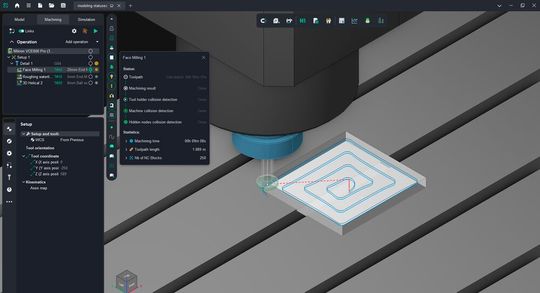
The CAD/CAM software Ency calculates the machining result and runs checks during toolpath calculation. This is especially convenient for simple projects that do not include fine-step finishing operations. In Ency 2.8 and Ency Robot 2.8, background simulation during toolpath calculation can now be configured more flexibly. System settings now let you define separately both the machining result calculation and the level of checks performed at the toolpath calculation stage.
If background machining simulation is disabled, the system calculates only the toolpath from the 3D model, while the machining result can be checked later in Simulation mode.
At the same time, operations that require the result of the previous machining step for correct calculation continue to work properly: Ency automatically calculates the required intermediate result for Waterline Roughing, Plane Roughing, Pocketing, Hole Machining, and all lathe machining operations. For example, when calculating Waterline Roughing, the result of Face Milling may also be calculated, while 3D Helical does not require the result of the previous operation.
If background machining simulation is enabled, the machining result is available immediately after toolpath calculation. This makes it easier to evaluate the state of the part or workpiece without launching Simulation mode separately, which is especially useful in projects without a large number of fine-step finishing operations. At the same time, collision detection may be disabled.
The level of collision detection can also be selected separately: holder-only collision detection for faster calculation, the holder + machine scenario, or full control of all machine nodes.
Depending on the selected settings, the new operation statuses immediately show how thoroughly the calculated toolpath has been verified. To support this, we introduced different operation statuses.
You can now control calculation time more precisely. In simple projects, you still get immediate visual feedback on the workpiece and detected issues. In more complex projects with many dependent operations, setups, or fine-step finishing passes, you can reduce background processing and avoid spending time on checks that are not needed at that stage.
Machining simulation in the Simulation mode
The Simulation mode has also been updated. Collision detection settings are now shown in a separate pop-up window that appears when you hover over the button with the exclamation mark. The detection level in Simulation mode cannot be set below the level defined in system settings for background simulation. If background collision detection are disabled or only partially enabled, Simulation mode still lets you choose the required verification level and run machining simulation there.
You also no longer need to start a full step-by-step simulation just to see the machining result and check the toolpath for collisions. You can select the required checking level and use the fast simulation buttons to get the result for a specific operation or for the whole machining process much faster. This lets you focus only on problematic operations.
Bar pull during Part-off with takeover
Ency 2.8 adds bar pulling during Part-off with takeover. It is now possible to control both the pulling length and the clamping depth. The operation’s CLData can define a strict sequence of motions in the NC program:
The calculation algorithm for Rotary machining operations has been updated. These operations are now multithreaded and distribute the load across all available processor cores. Operation execution time is now up to 10 times shorter.
Date: 08.12.2025
Naturally, we always handle your personal data responsibly. Any personal data we receive from you is processed in accordance with applicable data protection legislation. For detailed information please see our privacy policy.
Consent to the use of data for promotional purposes
I hereby consent to Vogel Communications Group GmbH & Co. KG, Max-Planck-Str. 7-9, 97082 Würzburg including any affiliated companies according to §§ 15 et seq. AktG (hereafter: Vogel Communications Group) using my e-mail address to send editorial newsletters. A list of all affiliated companies can be found here
Newsletter content may include all products and services of any companies mentioned above, including for example specialist journals and books, events and fairs as well as event-related products and services, print and digital media offers and services such as additional (editorial) newsletters, raffles, lead campaigns, market research both online and offline, specialist webportals and e-learning offers. In case my personal telephone number has also been collected, it may be used for offers of aforementioned products, for services of the companies mentioned above, and market research purposes.
Additionally, my consent also includes the processing of my email address and telephone number for data matching for marketing purposes with select advertising partners such as LinkedIn, Google, and Meta. For this, Vogel Communications Group may transmit said data in hashed form to the advertising partners who then use said data to determine whether I am also a member of the mentioned advertising partner portals. Vogel Communications Group uses this feature for the purposes of re-targeting (up-selling, cross-selling, and customer loyalty), generating so-called look-alike audiences for acquisition of new customers, and as basis for exclusion for on-going advertising campaigns. Further information can be found in section “data matching for marketing purposes”.
In case I access protected data on Internet portals of Vogel Communications Group including any affiliated companies according to §§ 15 et seq. AktG, I need to provide further data in order to register for the access to such content. In return for this free access to editorial content, my data may be used in accordance with this consent for the purposes stated here. This does not apply to data matching for marketing purposes.
Right of revocation
I understand that I can revoke my consent at will. My revocation does not change the lawfulness of data processing that was conducted based on my consent leading up to my revocation. One option to declare my revocation is to use the contact form found at https://contact.vogel.de. In case I no longer wish to receive certain newsletters, I have subscribed to, I can also click on the unsubscribe link included at the end of a newsletter. Further information regarding my right of revocation and the implementation of it as well as the consequences of my revocation can be found in the data protection declaration, section editorial newsletter.
The updated calculation also produces a smoother toolpath when working with normals and lateral angle, while the new Normal Smoothing Distance parameter makes it possible to fine-tune the smoothing level.
Usability improvements
This release also includes updated smart hints for operation parameters, updated icons in the operation creation window, an updated metallic effect for the 3D model, and a faster 3D model import algorithm. The support request window opened from the NC program generation window has also been updated.
Ency 2.8 also reduces startup time by optimizing active calculation and checking parameters, updates smart selection of 3D model elements and work with them, and adds new commands for manufacturer-supplied interpreters:
Heidenhain_ITNC530: CYCL DEF 267, 267, 252
Sinumerik840D_TurnMill: POCKET4, SubPrograms
Sinumerik840D_Mill: Cycle90
What was fixed
The release includes more than 160 fixes aimed at improving calculation stability and accuracy. The update addresses crashes and freezes during simulation, incorrect toolpath calculation, issues with large projects, opening and saving projects, machine kinematics, equipment settings, and false collision detections. Interface issues related to scaling, element display, and window behavior have also been fixed, along with improvements to sketches, construction tools, operation parameters, and geometry import.
Users with an active software maintenance contract (SMC) have already received notifications about the release and can now update to Ency 2.8.



:quality(80)/p7i.vogel.de/wcms/b0/7a/b07a7095a06502f296a68cc23c0333fd/0133339310v4.jpeg "The positive trends experienced in the machine tool industry are continuing into the second quarter: incoming orders increased by 12 percent compared to the previous year. (Source: VDW)")
:quality(80)/p7i.vogel.de/wcms/4b/e2/4be222cca85fc9ccbdf26c552cfc3c4c/0132990447v1.jpeg "A research project highlights potential of high-quality material loops for cars. (Source: BMW Group)")
:quality(80)/p7i.vogel.de/wcms/55/47/55478646728684cec46485443d736f85/0132634476v1.jpeg "Geopolitical tensions and weak demand weighed heavily on Italy's machine tool industry (Source: free licensed / KI-generiert)")
:quality(80)/p7i.vogel.de/wcms/2f/7a/2f7ac201c1abc14dc40a30d947684069/0132348722v1.jpeg "The Nova5e110T, a latest-generation all-electric injection moulding machine, produces a food-packaging application using liquid silicone rubber injection moulding. (Source: Negri Bossi)")
:quality(80)/p7i.vogel.de/wcms/8e/25/8e2561d12b8caeba7125507a0c957e6e/0133564611v1.jpeg "Nexgem brings together companies from the worlds of mechanical engineering, IT and software. (Source: VDW)")
:quality(80)/p7i.vogel.de/wcms/48/a5/48a599231b179ed4c8f2fc4f00fc80ac/0133459364v2.jpeg "Fakuma 2026 will mark its 30th edition in Friedrichshafen from 12 to 16 October, with around 1,600 exhibitors from 40 countries, innovation awards, expert discussions and career initiatives. (Source: Fakuma)")
:quality(80)/p7i.vogel.de/wcms/13/22/13224a29676f9fba818db663bcc63729/0133443239v1.jpeg "That’s a wrap for another AMB in Stuttgart. In around two years, metalworking innovations will once again take centre stage in Baden-Württemberg. Here, the organiser and industry representatives reflect on this year’s event ... (Source: Th. Wagner / Messe Stuttgart)")
:quality(80)/p7i.vogel.de/wcms/9f/3d/9f3da0d0fff1def9de2203feda4fde5d/0133450626v2.jpeg "Taipeiplas 2026 brought buyers and exhibitors together for active business discussions. (Source: Taitra)")
:quality(80)/p7i.vogel.de/wcms/18/cb/18cbc67d9db9584a02e1cb87adeb4955/0133336478v1.jpeg "The Meusburger compact slide 1:1 E 6100 was specially designed for use in stamping. (Source: Meusburger)")
:quality(80)/p7i.vogel.de/wcms/50/12/5012028b260c3beee1f6e7058bd71d39/0133204757v2.jpeg "For the hydraulic connection of the cylinders Meusburger offers suitable fittings, screw plugs and flat-sealing hydraulic couplings. (Source: Meusburger)")
:quality(80)/p7i.vogel.de/wcms/4b/0a/4b0a16305af8bb26afeba230a64b94cb/0133087107v1.jpeg "At Fakuma 2026, Hasco will present new developments for tool and mould making. (Source: Hasco)")
:quality(80)/p7i.vogel.de/wcms/85/0a/850a63867131938c36290a2ffab91545/0132699768v2.jpeg "A key focus at Meusburger’s trade fair stand is the comprehensive range of plates and mould bases. (Source: Meusburger)")
:quality(80)/p7i.vogel.de/wcms/32/44/32440bdff907b379245f456130355549/0133341463v1.jpeg "Stratasys F870 FDM system, a large-format additive manufacturing platform designed for industrial manufacturers, automotive OEMs, aerospace & defense production lines, looking to scale production on the factory floor. (Source: Stratasys)")
:quality(80)/p7i.vogel.de/wcms/f6/6e/f66e3f322d7e2a8fe7e80f808c67e607/0133319745v2.jpeg "Formnext brings together the global AM community and showcases the latest innovations in industrial 3D Printing and advanced production technologies. (Source: Mesago / Marc Jacquemin)")
:quality(80)/p7i.vogel.de/wcms/13/15/13156077bb6086d11a98b5375da5e858/0133159292v2.jpeg "Quickparts runs production through both its own in-house facilities and a certified network of manufacturing partners across North America, Europe, and Asia. (Source: Quickparts)")
:quality(80)/p7i.vogel.de/wcms/b2/2b/b22b2227432aa36f4e4a52349ce2da5d/0133002892v1.jpeg "he serial production of spare parts within GMH Gruppe marks the beginning of point for ProMateria’s next phase of development. (Source: GMH Gruppe)")
:quality(80)/p7i.vogel.de/wcms/24/07/2407a4874f3c763937892a12e3e7d125/0133564963v2.jpeg "(Source: Walter)")
:quality(80)/p7i.vogel.de/wcms/03/8e/038ec919753fabff71f6e3473c772f74/0133130761v2.jpeg "The core reason behind the adoption of humanoid robots in the manufacturing or tool and mould making industry is the lack of labour in these markets. (Source: © Maksudul - stock.adobe.com)")
:quality(80)/p7i.vogel.de/wcms/71/b5/71b582e7f0d98b40e0c5d0b8e1f11671/0133376631v1.jpeg "Mazak’s new CP-450 automation system integrated with a CV5-500 machining centre. (Source: Mazak)")
:quality(80)/p7i.vogel.de/wcms/98/17/9817f21be8809ce0840ac3cb0bd14757/0133317721v1.jpeg "A model produced by Ogle for an automotive industry customer. (Source: Hurco)")
:quality(80)/p7i.vogel.de/wcms/4d/da/4dda0d3b2a4c0b1c1e21dc2deba9264e/0133445150v1.jpeg "Capture machine data in real time and display it clearly with Hummingbird. (Source: Open Mind)")
:quality(80)/p7i.vogel.de/wcms/e1/7d/e17db1eab6fedf3237a12e0ffb739cb9/0133378692v2.jpeg "Meet at the Machine is Siemens’ new initiative designed to bring together machine builders, software and automation technologies to accelerate innovation across the machine tool industry and help manufacturers achieve productivity faster. (Source: Siemens)")
:quality(80)/p7i.vogel.de/wcms/da/36/da36247b3e7af69fece5d3840ab65dd5/0133337118v1.jpeg "Eva understands questions asked in natural language, detects deviations in the process, and suggests concrete solutions — an assistant that goes well beyond a typical chatbot. (Source: Engel)")
:quality(80)/p7i.vogel.de/wcms/66/ce/66cee106850827fbcf9a46eb0682f3d0/0133197817v1.jpeg "Designed for maximum flexibility, the Solidcam Simulator is a fully self-contained simulation system that runs independently. (Source: Machine Works)")
:quality(80)/p7i.vogel.de/wcms/9f/d6/9fd6f5e480734eb5fea4560d6cfdf484/0132969018v1.jpeg "Meusburger blocks for eroding with starting hole and thread (Source: Meusburger)")
:quality(80)/p7i.vogel.de/wcms/5f/66/5f66d32bcf6e2e2fb01b3d98f1c33930/0131994480v1.jpeg "A Mitsubishi Electric MV2400S wire-cut EDM machine will be the first demonstration model to arrive at the Kenilworth showroom and technical centre of recently-appointed sales agent, Whitehouse Machine Tools. (Source: Whitehouse Machine Tools)")
:quality(80)/p7i.vogel.de/wcms/d5/1d/d51def0b31e213e756bbfb9479fa9c7e/0129925621v2.jpeg "Automatic electrode feeding: Together with Sodick and Erowa, the Robot Compact 80 (ERC80) was integrated — including connection to the Zeiss measuring machine and chip-based job management. (Source: Sodick)")
:quality(80)/p7i.vogel.de/wcms/f9/ca/f9ca9cace88200a5ec0946f193264963/0129209504v1.jpeg "Neil Taylor, who has worked in the toolroom at Pre-Met for 20 years. (Source: Pre-Met)")
:quality(80)/p7i.vogel.de/wcms/c8/5b/c85b37436b1df84a1bfe39b5c6d1e201/0133199632v1.jpeg "Enspec is a new professional-grade bridge coordinate measuring machine (CMM) designed to make high-precision inspection more accessible for manufacturers and subcontractors. (Source: Hexagon)")
:quality(80)/p7i.vogel.de/wcms/73/44/73448e9feaa91c6c35ad23c500d770c1/0133160891v1.jpeg "Smartshot i is an intelligent cold runner system for LSR injection moulding. (Source: Elmet)")
:quality(80)/p7i.vogel.de/wcms/d6/ba/d6ba94485018261fa2476c7233b3c1ee/0132634611v1.jpeg "The new AI Knowledge Assistant, delivers natural language responses drawn from the full product documentation library, enabling faster onboarding and reducing the learning curve for new users. (Source: Metrologic DCS )")
:quality(80)/p7i.vogel.de/wcms/b6/77/b677375070249449de37c041cc40ec87/0132635157v1.jpeg "Simulation of sweep scanning inspection of a turbine blade in LK Metrology’s Camio 2026 R1 programming, analysis and reporting software, which now provides comprehensive support for Renishaw’s Revo 5-axis scanning probe system. (Source: LK Metrology)")
:quality(80)/p7i.vogel.de/wcms/c7/0c/c70ce96cc0e31dd84ca136e5f580b010/0133561039v1.jpeg "Diagram show the interface between an EWS Varia base unit (right), which remains in the lathe turret, and a toolholder and cutter mounted in a quick-change adapter. This rapid tool exchange mechanism is used across the company’s entire range of VX, VXT and VXP lathe toolholders. (Source: EWS)")
:quality(80)/p7i.vogel.de/wcms/ca/d1/cad1c8eeb1436e5df9a72b11101b7df5/0133377800v1.jpeg "The STC0440-BT40 now gives manufacturers and integrators a high-power platform for material-removal tasks. (Source: Pushcorp)")
:quality(80)/p7i.vogel.de/wcms/9e/85/9e855e6054e89e8a0db2b80562615f9f/0133227871v2.jpeg "Effective lubrication helps CNC machines maintain precision while reducing friction, heat and wear. (Source: Exxon Mobil)")
:quality(80)/p7i.vogel.de/wcms/34/bd/34bdcfe0ae89fb6384c256732af2d155/0133068647v1.jpeg "SMW’s C80 Giga inductive coupling system transmits up to 75 W of power and real-time signals at speeds of up to 1 Gbit/s. (SourceSMW-Autoblok / SMW-electronics)")
:quality(80)/p7i.vogel.de/wcms/0b/08/0b08341f8be2aa039063d7585d16e204/0133087099v1.jpeg "The Ruby Dark Mold Polishing Stone is designed for controlled material removal and consistent surface finishes in demanding mold polishing applications. (Source: Jacqueline Southby/ Boride)")
:quality(80)/p7i.vogel.de/wcms/44/e0/44e0d70e930c0ee85447518eda459259/0132763637v2.jpeg "The Focus was developed to meet changing requirements in parts cleaning. This cost-effective solvent cleaning system ensures a high level of cleanliness even with a relatively low cleaning volume. (Source: Karl Roll)")
:quality(80)/p7i.vogel.de/wcms/b8/6f/b86f649863182a925480692939ac91f8/0131684985v1.jpeg "Extreme high-speed Laser Material Deposition (EHLA) enables the additive deposition of functional surfaces with high precision and speed. This allows components to be efficiently coated, repaired, or manufactured with close-to-final-contour precision. (Source: Fraunhofer ILT)")
:quality(80)/p7i.vogel.de/wcms/d5/05/d5057e4ec3f7c3acbed8a4241d0683c6/0131673703v2.jpeg "Copper gauze for cleaning and polishing exposed round or conical surfaces. (Source: Guill)")
:quality(80)/p7i.vogel.de/wcms/5a/e5/5ae5dfc67c07f0ca8347161642c36df3/0130721540v1.jpeg "Müller Präzisionswerkzeuge supports its customers with customised, application-specific tools. (Source: Müller)")
:quality(80)/p7i.vogel.de/wcms/2a/08/2a08f8bd2df95ca843d52cbce64bf355/0131212753v1.jpeg "It has taken time, but the full force of the government’s steel policy is beginning to have a devastating impact on the downstream manufacturing sector according to the President of the Confederation of British Metalforming (CBM). (Source: CBM)")
:quality(80)/p7i.vogel.de/wcms/9e/bd/9ebd826ceed28c644a9205bdbf82beb4/0131007997v2.jpeg "The lead-free aluminium solutions that combine high performance with stable and reliable machining processes. (Source: Eural Gnutt)")
:quality(80)/p7i.vogel.de/wcms/d5/e6/d5e68c74fabff18ef737ee767b7b359f/0130415707v1.jpeg "Efficiency in machining and a reduced carbon footprint will be at the centre of Swiss Steel Group’s presentation at Wire 2026 in Düsseldorf. (Source: Swiss Steel Group)")
:quality(80)/p7i.vogel.de/wcms/eb/2e/eb2ec2f935e6eded7702883eb129e64e/0133564614v2.jpeg "Gerald Bloom, Chairman of Big Bear Plastic Products in Droitwich, was given the Lifetime Achievement Award at the National Family Business Dinner for his 70-year contribution to industry. (Source: Big Bear Plastic Products)")
:quality(80)/p7i.vogel.de/wcms/c0/b8/c0b806ad8153cc46307de1b9142504e0/0133449473v2.jpeg "Peter Jungwirth will assume the role of Managing Director of Engel Serbia. (Source: Engel)")
:quality(80)/p7i.vogel.de/wcms/d9/2f/d92fb796119e91350f908a0124548525/0133342044v2.jpeg "(from left to right): Mr. Xu Bin, General Manager of Global Industry Line, Haitian International; Mr. Zhang Bin, CEO of Haitian Group; Mr. Thomas Wildt, CEO of Hennecke; Mr. Jens Winiarz, Sales Director of Hennecke GmbH; Mr. Andrew Chan, CEO of Hennecke China. (Source: Haitian)")
:quality(80)/p7i.vogel.de/wcms/df/be/dfbe11ae0e8a76348550a11e48b46bfb/0133319718v1.jpeg "Clarity Plastics, which was formed in 2025 following the acquisitions of Barkley Plastics and LVS, has seen its collective efforts lead to successful accreditation to ISO 14001. (Source: Clarity Plastics)")
:fill(fff,0)/p7i.vogel.de/companies/66/0e/660e93698db24/hasco-logo-or-b50.jpeg "hasco-logo-or-b50 (HASCO)")
:fill(fff,0)/images.vogel.de/vogelonline/companyimg/84400/84424/65.jpg "logo.jpg ()")
:fill(fff,0)/images.vogel.de/vogelonline/companyimg/64200/64280/65.png "Diprofil_logo.png ()")
:quality(80)/p7i.vogel.de/wcms/b5/4f/b54fc77e69d8afd4ecfc90871ebf1ca9/0130174588v1.jpeg "Ency joined Factory of the Future as a solution provider that connects engineering data with real production. (Source: Ency)")
:quality(80)/p7i.vogel.de/wcms/07/8a/078a8afb2a610c56aa5d539fee33bddd/0129959959v1.jpeg "0129959959v1 (Source: Ency)")
:quality(80)/p7i.vogel.de/wcms/39/e5/39e5ed88eb51e1c40aa52e1b85a07b16/0132156489v1.jpeg "Ency 2.9 brings improvements to machining reports, operation statistics, and license administration. (Source: Ency)")
:quality(80)/p7i.vogel.de/wcms/43/0c/430cb8b657b4cefefff0376b34e9f416/0132390023v1.jpeg "Ency 3.0 introduces new tools for CAM automation, advanced CNC machining, robot programming and connected manufacturing workflows. (Source: Ency)")